Oracle NetSuite already has AI built into the platform through features like Ask Oracle and Narrative Insights. But a separate capability, the NetSuite AI Connector Service, does something different. It lets external AI applications such as Claude and ChatGPT connect directly to NetSuite data and tools using an open standard called Model Context Protocol, or MCP. This is not simply another AI feature added to NetSuite. It is a connection layer that lets AI assistants outside NetSuite work with your business data under your own permission structure. This guide explains what the connector actually does, how MCP fits into the picture, what finance and operations teams can realistically use it for, and how UAE and KSA organizations should think about adopting it.
What Is the NetSuite AI Connector Service?
The NetSuite AI Connector Service is a protocol-based integration that connects NetSuite to external AI clients through Model Context Protocol, giving supported AI applications structured, permission-based access to NetSuite data and a defined set of tools. It is built and distributed through a NetSuite SuiteApp, and it is separate from NetSuite’s native AI features like Ask Oracle, which operate entirely inside the NetSuite interface.
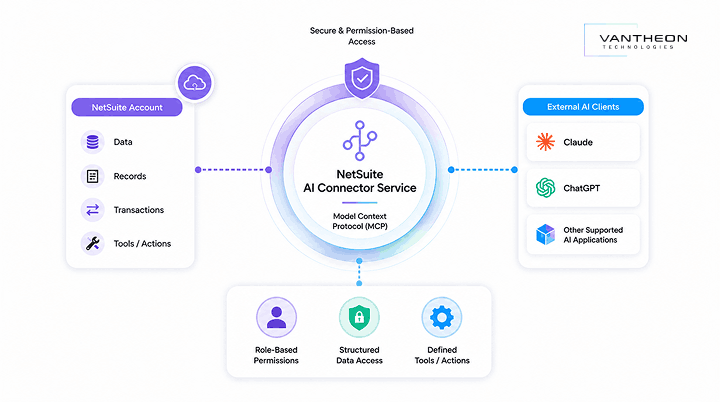
The distinction matters because it answers a question people frequently ask: what is the NetSuite AI Connector? It is not an AI model itself, and it does not generate answers on its own. It is the bridge that allows an AI client, such as Claude, to send requests into NetSuite and receive structured data or execute a defined action back, based on the exact permissions granted to the connecting role.
How Does the NetSuite AI Connector Work?
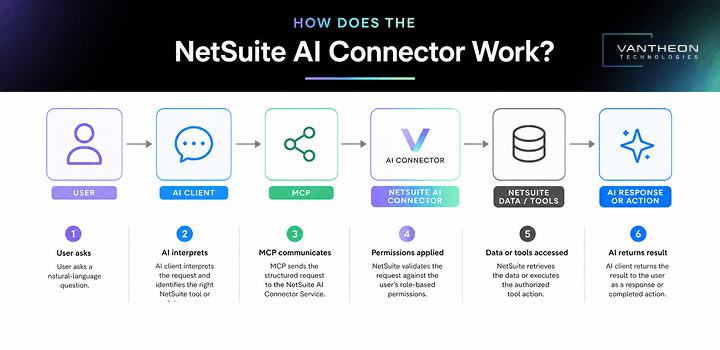
The connector works through a defined sequence: a user asks a natural language question inside a supported AI client, the client interprets the request, MCP relays that request to NetSuite, NetSuite applies the connecting user’s role-based permissions, the relevant data or tools are accessed, and the result is returned to the AI client as a response or, where a tool supports it, as a completed action.
1. User asks a natural-language question
A finance or operations team member types a plain-language request into a connected AI client, such as asking for open invoices over a certain amount or the status of a specific sales order.
2. AI client interprets the request
The AI client, such as Claude, interprets the intent behind the question and determines which available NetSuite tool or data source can answer it.
3. MCP communicates with NetSuite
Model Context Protocol carries the structured request from the AI client to the NetSuite AI Connector Service, acting as the standardized communication layer between the two systems.
4. NetSuite applies user permissions
NetSuite evaluates the request against the permissions assigned to the connecting custom role. If the role does not have access to the requested record type or action, the request is denied at this step, regardless of what the AI client asked for.
5. Relevant data or tools are accessed
Once permissions are confirmed, NetSuite retrieves the requested data, such as a transaction record or financial report, or executes the specific tool action the role is authorized to perform.
6. AI returns the result
The AI client receives the structured result from NetSuite and presents it to the user as a readable answer, and where the workflow calls for it, as a completed action such as a created record.
What Is Model Context Protocol and Why Does It Matter for ERP?
Model Context Protocol is an open standard that gives AI applications a consistent, structured way to connect to external systems such as NetSuite, rather than requiring a custom-built integration for every AI tool an organization wants to use. MCP itself is not an ERP, an AI model, or a piece of business software. It is a protocol, similar in spirit to how a common file format lets different applications read the same document.
This directly answers what MCP in ERP is: it is the connecting layer, not the system doing the accounting or the system generating the response. For NetSuite specifically, MCP means that instead of building a one-off connection between NetSuite and each AI provider, the platform exposes a standardized set of tools that any MCP-compatible AI client can use, provided the client supports the protocol and the connecting NetSuite role has the right permissions.
What Can the NetSuite AI Connector Actually Do?
The NetSuite AI Connector Service, through its standard MCP tools, currently supports a defined set of read and limited write operations, including looking up transactions such as invoices and sales orders, retrieving financial statement and sales report data, viewing customer, employee, and contact records, and creating certain entity records where the connecting role is authorized to do so.
Based on the standard tool set available through the officially supported SuiteApp, this typically covers around a set of standard MCP tools distinct MCP tools spanning transaction lookups, financial reporting views, contact and customer record access, and specific record creation actions. What the connector can do is entirely bound by the permissions assigned to the custom role used for the connection, so two organizations connecting the same AI client may have very different capabilities available depending on how their MCP role is configured.
NetSuite AI Connector vs Native NetSuite AI Features
Native NetSuite AI features, such as Ask Oracle, are built into the NetSuite interface itself and only work when a user is logged into NetSuite directly. The NetSuite AI Connector Service works in the opposite direction. It brings NetSuite data out to external AI clients that a user may already be working in, such as Claude, rather than bringing an AI assistant into the NetSuite screen.
This is an important distinction for anyone evaluating AI-enabled ERP options. Ask Oracle is a conversational assistant scoped entirely to the NetSuite environment. The AI Connector Service is an access layer that lets separate AI applications query and, within limits, act on NetSuite data. The two are complementary, not competing, but they solve different problems and involve different setup, permissions, and governance considerations.
Claude & NetSuite: How the AI Connection Works
Claude connects to NetSuite through a custom connector configured with an MCP endpoint URL specific to the NetSuite account, using OAuth 2.0 authorization and a dedicated NetSuite role built specifically for MCP operations. This directly answers: Can Claude connect to NetSuite? Yes, through the AI Connector Service, provided the NetSuite account has the required SuiteApp installed, a properly permissioned MCP role configured, and the connecting user has access to a Claude plan that supports custom connectors.
Administrators cannot use their own login for this connection. NetSuite requires a dedicated custom role, separate from the standard Administrator role, to be used for MCP operations, and that role’s permissions determine exactly which of the standard MCP tools become visible and usable inside Claude. Other MCP-compatible AI clients, including ChatGPT, can connect using the same underlying protocol and a similarly configured role, though exact setup steps vary by client.
AI Assistant for NetSuite: What Can Finance Teams Ask?
Finance teams connecting an AI assistant to NetSuite through the connector can typically ask questions such as which invoices are still outstanding for a given customer, what a specific sales order’s current status is, or what a financial statement shows for a chosen period, provided the connecting role has view access to those records.
Some practical examples relevant to UAE and KSA finance teams include asking for a summary of receivables by subsidiary, checking whether a specific vendor bill has been recorded, or pulling sales report data for a regional business unit. The answers returned depend entirely on what NetSuite tools and records the connecting role can see, and Oracle recommends verifying AI-generated answers against the underlying NetSuite data before relying on them for a decision, since AI clients can produce incorrect or hallucinated results.
AI Agents for Finance Automation with NetSuite
An AI assistant answers questions and retrieves information when asked. An AI agent, by contrast, is designed to carry out a sequence of actions toward a goal, sometimes with limited human involvement at each step. This distinction matters because the two terms are often used interchangeably in marketing content, but they describe meaningfully different levels of autonomy.
The NetSuite AI Connector Service, in its current form, primarily supports assistant-style interactions: a user asks, the system responds or performs a single authorized action. Building genuine multi-step AI agent workflows around NetSuite, such as automatically matching a batch of transactions and initiating a defined follow-up process, generally requires custom MCP tools built for that specific workflow, rather than relying solely on the standard tool set. Organizations exploring finance automation should treat “AI agent” claims carefully and confirm exactly what level of autonomy a given tool or vendor is actually offering.
NetSuite AI Integration for UAE Businesses
UAE businesses evaluating NetSuite AI integration should treat the connector as a way to give finance and operations staff faster access to NetSuite data through tools they may already use, such as Claude, rather than as a replacement for existing reporting processes. For organizations managing multiple free zone and mainland entities, a properly scoped MCP role can allow a regional finance lead to query consolidated data without needing to build a new NetSuite report each time a question comes up.
It is worth being clear that the connector itself does not guarantee compliance with UAE VAT reporting requirements. It provides a faster way to retrieve and review data that already exists in NetSuite. Accuracy and compliance still depend on how that underlying data was recorded and how carefully AI-generated answers are checked against the source records before being used in a filing or a management report.
How KSA Businesses Can Use NetSuite AI Integration
Saudi Arabian businesses can use the NetSuite AI Connector Service to give finance and procurement teams a faster way to check transaction status, review vendor records, and pull financial data without navigating multiple NetSuite screens, particularly useful for teams managing high transaction volumes tied to ZATCA e-invoicing requirements. As with UAE deployments, the connector supports faster data retrieval and review; it does not itself validate or guarantee ZATCA compliance, which still depends on how transactions are recorded and reviewed within NetSuite.
For KSA organizations running multiple business units, a well-configured MCP role gives regional teams consistent access to the specific data they are authorized to see, without requiring every question to route through a central NetSuite administrator.
Security and Governance: Is It Safe to Connect AI to NetSuite?
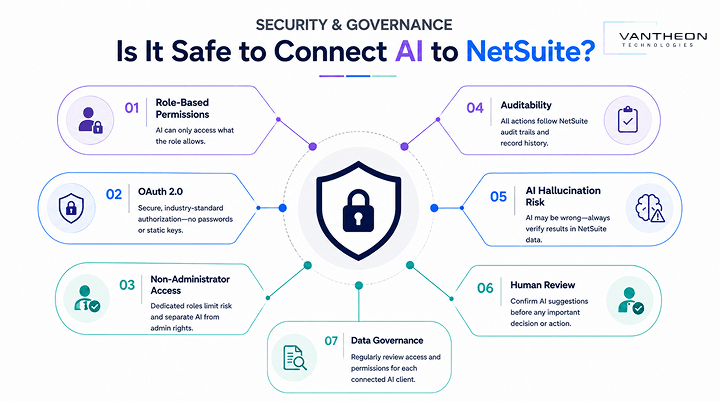
The NetSuite AI Connector Service is built around role-based permissions and OAuth 2.0 authorization, meaning an AI client can only see or act on exactly what the connecting NetSuite role is configured to allow, which makes governance largely a matter of how carefully that role is set up rather than a limitation of the connector itself.
Role-Based Permissions
Every capability exposed to an AI client is controlled by the specific permissions assigned to the custom MCP role used for the connection. A tool the role has no permission for simply will not appear as available to the AI client.
OAuth 2.0
Authentication between the AI client and NetSuite uses OAuth 2.0, the same industry-standard authorization framework used across modern cloud integrations, rather than a shared password or static API key.
Non-Administrator Access
NetSuite specifically requires that MCP operations run through a dedicated custom role rather than an Administrator login, which limits the blast radius of any single connection and keeps AI access separate from full system administration rights.
Auditability
Because MCP requests pass through a defined role with tracked permissions, actions taken through the connector remain subject to the same underlying NetSuite record history and audit trail as any other system activity performed by that role.
AI Hallucination Risk
Oracle specifically notes that AI clients connecting through MCP may produce incorrect or hallucinated results and recommends that users verify AI-generated answers against the actual NetSuite data before relying on them, particularly for financial decisions.
Human Review
Given the hallucination risk, a human reviewer should confirm any AI-suggested figure or action against the source NetSuite record before it informs a filing, payment, or management decision, especially in the early stages of adopting the connector.
Data Governance
Organizations should treat MCP role configuration as an ongoing governance task, reviewing which tools and records each connected AI client can access on a regular basis, the same way they would periodically review any other integration’s permission scope.
Standard MCP Tools vs Custom NetSuite AI Tools
Standard MCP tools are the pre-built set of NetSuite operations, covering transaction lookups, financial reports, and core record access, made available through NetSuite’s officially supported MCP SuiteApp. Custom NetSuite AI tools are additional, purpose-built tools that a development team creates to expose specific business logic or workflows not covered by the standard set.
Most organizations start with the standard tools, since they cover common needs like checking invoice status or pulling a sales report without any custom development. Businesses with more specific automation goals, such as connecting a particular approval workflow or a specialized reporting need, typically require custom MCP tools built around their own NetSuite configuration, which involves development work rather than a simple setup toggle.
NetSuite AI Connector Service and MCP Apps
Beyond the core connector, the broader MCP ecosystem includes MCP-compatible applications and clients built by different vendors, all of which can potentially connect to NetSuite through the same protocol, provided they support MCP and the connecting NetSuite role is configured with appropriate permissions. This is the practical benefit of an open protocol approach: an organization is not locked into a single AI provider, and as more MCP-compatible tools become available, the same underlying NetSuite connector setup can support them, subject to each client’s own capabilities and NetSuite’s supported permission model.
How Vantheon Technologies Can Help with NetSuite AI Integration
Vantheon Technologies helps UAE and Saudi businesses set up and govern the NetSuite AI Connector Service correctly from the start, including installing the required SuiteApp, designing a properly scoped custom MCP role, and configuring OAuth 2.0 access so finance and operations teams can connect supported AI clients like Claude without over-exposing sensitive data.
Where standard MCP tools do not cover a specific business need, our team also builds custom NetSuite AI tools tailored to your workflows, whether that involves a specialized reporting view, a regional compliance-related data check, or a defined action tied to your existing approval processes. We help organizations approach AI-powered finance automation responsibly, with clear governance and human review built into the process rather than treated as an afterthought.
How to Prepare Your NetSuite Environment for AI
Before enabling the NetSuite AI Connector Service, businesses should confirm they have Administrator access to install the required SuiteApp, review and clean up role structures so a dedicated MCP role can be built without unnecessary access and enable OAuth 2.0 features if not already active in the account.
It also helps to identify which specific business questions or workflows the connector should support first, rather than granting broad access from day one. Starting with a narrow, well-defined set of permissions and expanding gradually as trust in the AI client’s outputs grows is a more controlled approach than exposing the full standard tool set immediately. Finally, teams should agree internally on a review process for AI-generated answers before they inform any financial or compliance-related decision.
Conclusion
The NetSuite AI Connector Service turns NetSuite into a more accessible source of business context for supported AI clients by using Model Context Protocol as the connecting standard. It is not the same as NetSuite’s native AI features; it is not an AI model in its own right, and it does not make NetSuite autonomous on its own. For UAE and KSA organizations, the real opportunity is not simply adding AI to ERP. It is connecting AI clients your teams already use to trusted business data and controlled, permission-based workflows, so finance and operations staff can retrieve information, analyse it, and, where authorized tools allow, take action more efficiently, all while keeping human review firmly in place.
Ready to Connect AI to Your NetSuite Environment the Right Way?
The NetSuite AI Connector Service opens up real efficiency gains, but getting the setup, permissions, and governance right from the start matters just as much as the connection itself. Vantheon Technologies helps UAE and Saudi businesses configure NetSuite AI integration securely and put it to practical use.
Schedule a Demo with our NetSuite specialists to see how AI integration can fit into your finance and operations workflows.
Beyond AI Connector setup, Vantheon Technologies supports the full NetSuite lifecycle for businesses across the UAE and KSA, including:
- NetSuite Consulting to align NetSuite’s AI and automation capabilities with your business processes
- NetSuite Implementation for organizations setting up NetSuite for the first time
- NetSuite Integration to connect NetSuite with your existing systems and AI tools
- NetSuite Customization to build custom MCP tools and workflows specific to your operations
- NetSuite Support Services for ongoing managed support and governance after go-live
- NetSuite Mobile ERP to keep your team connected to NetSuite data wherever they are working
Whatever stage of your NetSuite AI journey you are at, Vantheon Technologies is ready to help you move forward with confidence.
FAQ Section
What is the NetSuite AI Connector Service?
The NetSuite AI Connector Service is a protocol-based integration, distributed as a NetSuite SuiteApp, that connects NetSuite to external AI clients using Model Context Protocol, giving those clients structured, permission-based access to NetSuite data and a defined set of tools.
How does the NetSuite AI Connector use Model Context Protocol?
MCP acts as the standardized communication layer between an AI client and NetSuite, carrying requests from the AI application to NetSuite and returning structured data or action results back, all governed by the permissions of the connecting NetSuite role.
Can Claude connect to NetSuite through the AI Connector?
Yes. Claude can connect to NetSuite by configuring a custom connector with the account’s MCP endpoint URL, authorizing through OAuth 2.0, and using a dedicated custom NetSuite role built specifically for MCP operations rather than an Administrator login.
What can an AI assistant do with NetSuite data?
An AI assistant connected through the NetSuite AI Connector can look up transactions such as invoices and sales orders, retrieve financial statement and sales report data, view customer and contact records, and create certain records, limited entirely by the permissions granted to the connecting role.
Is NetSuite AI Connector secure for finance teams?
The connector uses OAuth 2.0 authorization and requires a dedicated, non-administrator custom role with specifically scoped permissions, which gives organizations granular control over what an AI client can access. Security in practice depends on how carefully that role is configured and reviewed over time.
How can UAE and Saudi businesses implement NetSuite AI integration?
UAE and Saudi businesses should start by confirming Administrator access and OAuth 2.0 features are enabled, install the supported MCP SuiteApp, build a narrowly scoped custom role for MCP operations, and connect a supported AI client, ideally with guidance from an experienced NetSuite implementation partner to ensure governance is handled correctly from the outset.
Leave a Reply